
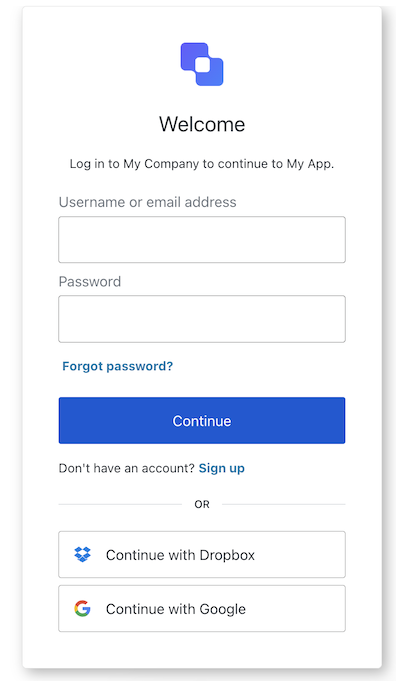
The Login screen handles the primary authentication flow, allowing users to sign in with username/password credentials or via a federated identity provider. This screen is presented when a user attempts to log in to an application.
ACUL Login
Import Example
import React, { useState } from "react";
import {
  useLogin,
  useUser,
  useTenant,
  useBranding,
  useClient,
  useOrganization,
  usePrompt,
  useUntrustedData,
} from "@auth0/auth0-acul-react/login";

function LoginForm() {
  const { login, federatedLogin } = useLogin();
  return (
    <button onClick={() => login({ username: "user@example.com", password: "secret" })}>
      Sign In
    </button>
  );
}

Context Hooks

useBranding
Provides branding configurations, such as logo, colors, and theme settings displayed on the login screen.
Example
import { useBranding } from '@auth0/auth0-acul-react/login';
function CustomTheme() {
  const branding = useBranding();
}
useClient
Provides client-related configurations, such as id, name, and logoUrl, for the login screen.
Example
import { useClient } from '@auth0/auth0-acul-react/login';
function AppInfo() {
  const client = useClient();
}
useOrganization
Provides information about the user’s organization if the login is organization-scoped. Returns null when no organization context is present.
Example
import { useOrganization } from '@auth0/auth0-acul-react/login';
function OrgSelector() {
  const organization = useOrganization();
  if (!organization) {
    return <p>No organization context</p>;
  }
}
usePrompt
Contains data about the current prompt in the authentication flow.
Example
import { usePrompt } from '@auth0/auth0-acul-react/login';
function FlowInfo() {
  const prompt = usePrompt();
}
Contains details specific to the login screen, including its configuration and context.
Example
import { useScreen } from '@auth0/auth0-acul-react/login';
function ScreenDebug() {
  const screen = useScreen();
}
useTenant
Contains data related to the tenant, such as id and associated metadata.
Example
import { useTenant } from '@auth0/auth0-acul-react/login';
function TenantInfo() {
  const tenant = useTenant();
}
useTransaction
Provides transaction-specific data for the login screen, such as active connections, available login methods, and current flow state.
Example
import { useTransaction } from '@auth0/auth0-acul-react/login';
function TransactionInfo() {
  const transaction = useTransaction();
}
useUntrustedData
Handles untrusted data passed to the screen, such as a prefilled username from URL parameters.
Example
import { useUntrustedData } from '@auth0/auth0-acul-react/login';
function PrefilledForm() {
  const untrustedData = useUntrustedData();
}
useUser
Details of the active user, including username, email, and available authentication methods.
Example
import { useUser } from '@auth0/auth0-acul-react/login';
function UserProfile() {
  const user = useUser();
}

Methods

federatedLogin
void | Promise<void>
Initiates authentication via a federated identity provider such as Google or GitHub.
Example
import { useLogin } from '@auth0/auth0-acul-react/login';

function SocialButton() {
  const { federatedLogin } = useLogin();
  return (
    <button onClick={() => federatedLogin({ connection: 'google-oauth2' })}>
      Sign in with Google
    </button>
  );
}
login
void | Promise<void>
Submits the user’s credentials to complete authentication on the login screen.
Example
import { useLogin } from '@auth0/auth0-acul-react/login';

function LoginForm() {
  const { login } = useLogin();
  return (
    <button onClick={() => login({ username: 'user@example.com', password: 'secret' })}>
      Sign In
    </button>
  );
}
pickCountryCode
void | Promise<void>
Opens the country code picker for phone-based login flows.

Common/Utility Hooks